Pilot · Demo by request

Mileage Pro

Mileage-log and reporting workspace for tax offices. Track client mileage, classify trips by purpose, calculate route miles, and generate reports for Schedule C and Form 4562.

Who This Is For

Mileage Pro is designed for tax offices that need to collect and organize mileage logs from multiple clients. It's particularly useful for offices serving self-employed individuals, gig workers, and small businesses who claim vehicle deductions.

  • Tax offices preparing Schedule C returns with vehicle expenses
  • Offices that want a centralized system to collect client mileage data
  • Preparers who need to produce mileage summaries for Form 4562
  • Firms serving rideshare drivers, delivery workers, and contractors
The Problem It Addresses

Clients often arrive at tax time with incomplete or disorganized mileage records. Handwritten logs, spreadsheet fragments, and app exports in various formats make it difficult to verify deduction amounts. Mileage Pro provides a structured workspace where clients can log trips throughout the year, and tax offices can review, classify, and export the data as PDF/CSV summaries oriented to Schedule C and Form 4562.

Illustrative Workflow — Not a Feature Guarantee

How a Tax Office Might Use Mileage Pro

  1. Set up client workspace — Create a mileage workspace for each client. Generate an intake link for the client to access.
  2. Client logs trips — Client enters trips via web interface: date, origin, destination, purpose, and miles. Route calculation available where configured.
  3. Staff reviews entries — Office staff reviews logged trips on the multi-client dashboard. Classify trips by category (business, personal, medical, charitable).
  4. Generate reports — Export mileage summary in PDF or CSV format. ALL-CAPS summary format available for Schedule C worksheets.
  5. Compare to expense method — Optional reports compare mileage deduction to actual expense method.

This workflow describes intended use based on pilot testing. Actual capabilities depend on configuration. Mobile apps are not yet released.

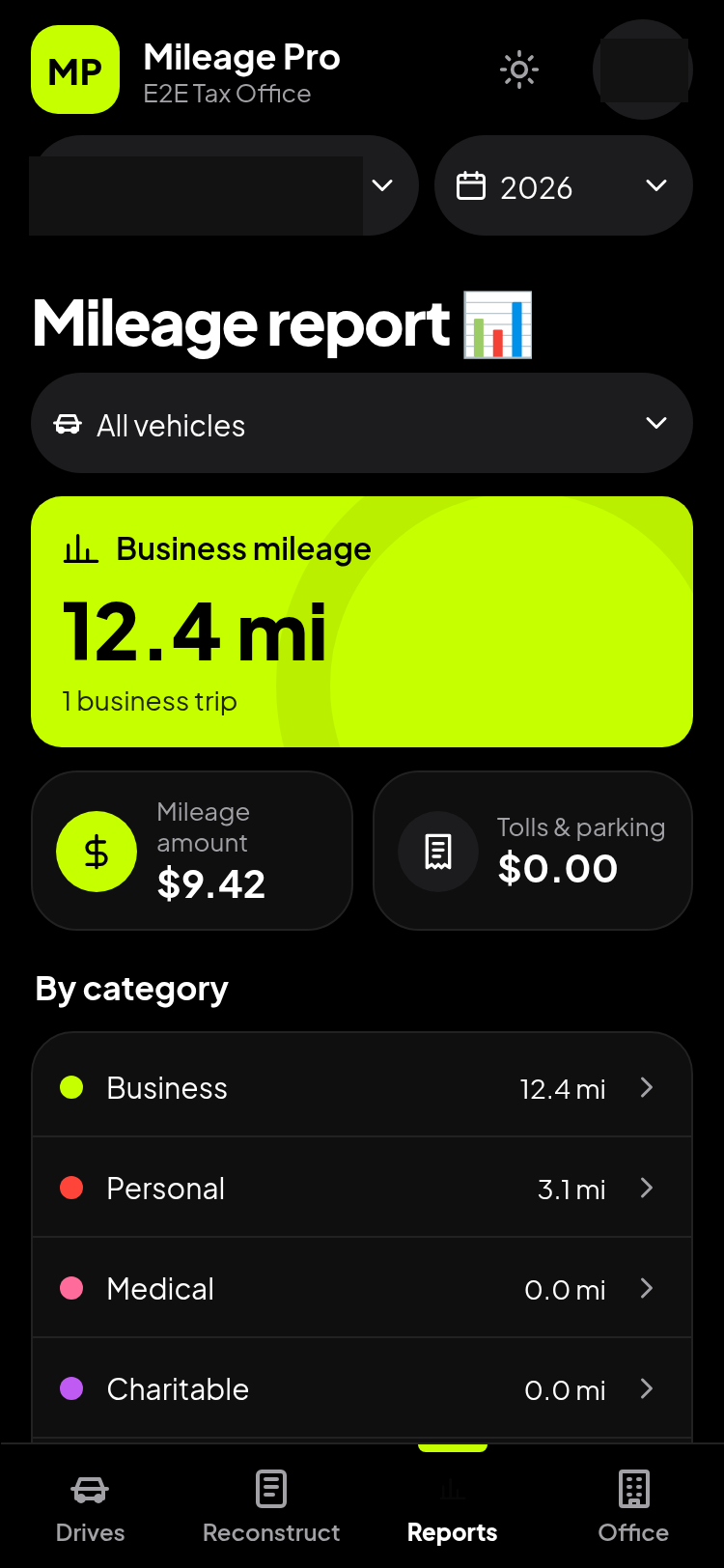
Mileage Pro reports screen showing mileage summary by category with business, personal, medical, and charitable trip totals
Historical report screen. Identifying details redacted; capture date, build and test-data provenance unverified. Not a current mileage-rate or production-readiness claim.

Capabilities

Multi-Client Dashboard

View and manage mileage logs for all clients from a single dashboard.

Client Intake Links

Generate unique intake links for clients to log their own trips.

Trip Classification

Classify trips as business, personal, medical, or charitable.

Places Database

Save frequent destinations for quick entry. System calculates route miles between saved places.

PDF & CSV Export

Export mileage summaries in PDF or CSV format. ALL-CAPS format matches traditional Schedule C worksheet style.

Mileage vs. Expense

Compare standard mileage deduction to actual expense method when expense data is available.

Current Limitations & Readiness

Frequently Asked Questions

Can clients log trips from their phone?
Clients can use the web interface on mobile browsers. Native iOS and Android apps are not yet released. GPS tracking on the web version requires the browser to remain in the foreground.
Does Mileage Pro calculate the IRS mileage rate?
The system can apply mileage rates for calculations, but users must verify the rates are current. IRS rates change annually and sometimes mid-year.
Can I import existing mileage logs?
CSV import is available for bulk data entry. Format requirements depend on the current version.
Is client data encrypted?
Data is encrypted in transit (HTTPS). Encryption at rest depends on your hosting configuration for self-hosted deployments.
How does this connect to my tax software?
Mileage Pro does not integrate directly with tax preparation software. You export reports and enter totals manually.

Enterprise Licensing

Mileage Pro is licensed per office under Tax Partners USA's enterprise model. There are no monthly subscriptions or online checkout.

  • White-label available: Rebrand with your office name and logo for client-facing intake links.
  • Self-hosted option: Not yet verified. Contact us to discuss availability.
  • Quote-based pricing: Licensing cost depends on expected client volume and deployment needs.
  • Support included: Setup, training, and ongoing support are discussed as part of your quote.

Request a private demonstration.

We'll show you the multi-client dashboard, trip logging, and report exports using sample data.